Contact form 7 sent box color
This is just in from: http://hoganchua.com/contact-form-7-styling/
Much better explained then I did before:
.wpcf7-form {
background:#; /* Add a Hex Color */
padding:20px 20px; /* %, px or em - 1st = top & bottom padding 2nd = left & right padding */
border:px solid #f6efdf; /* border-width, border-style, border color */
margin: 0px 0px 0px 0px; /* top, right, bottom & left */
border-radius:10px; /* Makes the edges rounded */
text-align: center; /* left, right, center */
font-size: px; /* %, px or em */
color: #ffffff; /* Add a Hex Color */
font-style: ; /* italic, normal or oblique */
font-variant: ; /* small-caps */
font-weight: ; /* bold, bolder, lighter or anything between 100-900 */
width: 100%; /* %, px or em */
}

/* border-styles: none, dotted, dashed, double, groove, ridge, inset, outset */

.wpcf7-form input {
background:#f6f6f6; /* Add a Hex Color */
padding:5px 7px; /* %, px or em - 1st = top & bottom padding 2nd = left & right padding. */
border:0px solid #ffffff; /* border-width, border-style, border color */
margin:0px; /* If there is only one value = same margin for top, right, bottom & left */
border-radius:0px; /* Makes the edges rounded */
text-align: center; /* left, right, center */
font-size: px; /* %, px or em */
color: #; /* Add a Hex Color */
font-style: ; /* italic, normal or oblique */
font-variant: ; /* small-caps */
font-weight: ; /* bold, bolder, lighter or anything between 100-900 */
width: %; /* %, px or em */
}
.wpcf7-form textarea {
background:#f6f6f6; /* Add a Hex Color */
padding:5px 0px 5px 7px; /* Can change it to 2 or just 1 variable - same as above. */
border:0px solid #ffffff; /* border-width, border-style, border color */
border-radius:0px; /* Makes the edges rounded */
text-align: center; /* left, right, center */
font-size: px; /* %, px or em */
color: #; /* Add a Hex Color */
font-style: ; /* italic, normal or oblique */
font-variant: ; /* small-caps */
font-weight: ; /* bold, bolder, lighter or anything between 100-900 */
width: 100%; /* %, px or em */
}
.wpcf7-form p {
color:#33CC33; /* This edit the font color of form titles */
margin-top:0px; /* %, px or em */
margin-bottom:0px; /* %, px or em */
}
.wpcf7-form .wpcf7-submit {
background:#f6f6f6; /* This edit the button colour */
cursor:pointer;
padding-left:25px; /* Changes the button Size. */
padding-right:25px; /* Changes the button Size. */
padding-top: px; /* Changes the button Size. */
padding-bottom: px; /* Changes the button Size. */
color:#000000; /* This edit the button text colour */
border-radius: px; /* %, px or em */
}

/* Button Hover Color */

.wpcf7-form input[type="submit"]:hover {
background: rgba(85,161,39,1); /* Use RBG and Opacity anywhere from 0 > 1 */
color: #ffffff !important; /* Button Hover Text Color */
}

/* Feelin' Adventurous? You can try some more css styles. Go to http://www.w3schools.com/cssref/default.asp */
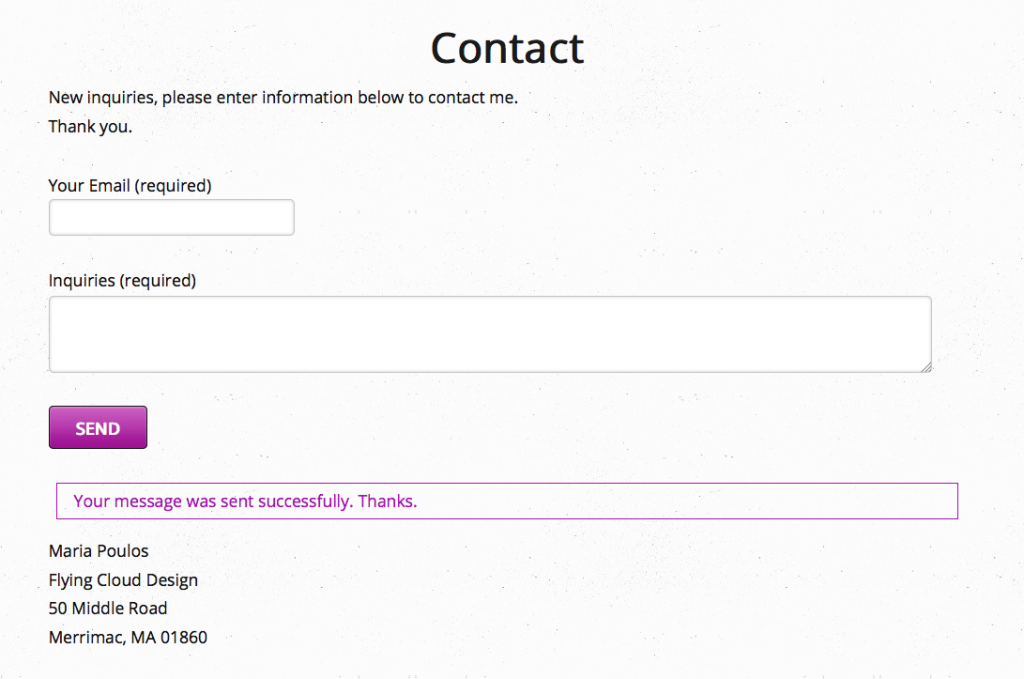
CSS code for border color on contact form 7 for mail sent OK box:
Switch to your own color
.wpcf7 .wpcf7-mail-sent-ok
{
border-top-color: #997551;
border-right-color: #997551;
border-bottom-color: #997551;
border-left-color: #997551;
border-top-width: 1px;
border-right-width: 1px;
border-bottom-width: 1px;
border-left-width: 1px;
color: #997551;
}
OR
.wpcf7 .wpcf7-mail-sent-ok{
border-style: solid;
border-color: #a611b3;
border-width: 1px;
color: #a611b3;
background-color:#none;
margin:0;
padding:10px;
-webkit-border-radius: 10px;
-moz-border-radius: 10px; border-radius: 10px;
}